
The AI conversation is focused on personal productivity. But learning how to scale productivity with agents brings clear benefits.
Open LinkedIn on any given day and you’ll see the same pattern: someone discovers that an LLM can draft their email, summarize a meeting, autocomplete their code or write a report. They post about it. Everyone seems impressed. The algorithm loves the interaction. Repeat.
And look, we’re not saying personal productivity is unimportant. On the contrary, we advocate for training & adoption because we see great return! Copilot, Claude, ChatGPT.. these tools are genuinely useful. But the conversation has become lopsided. Almost all of the attention goes to individual productivity gains: saving ten minutes here, automating a draft there. The impact on an individual level is clear, but can be very hard to scale consistently.
Meanwhile, the technology that actually transforms how organizations operate, (autonomous) agents embedded in departmental workflows, are no longer in the main conversation.
We think that’s a mistake. And we’ve seen the difference firsthand. So let’s dive into how you can scale productivity with agents!
The challenge with Personal Productivity
The biggest challenge with personal productivity AI isn’t the technology, it’s the adoption curve. Every organization has a handful of frontrunners who dive in, experiment, and genuinely transform how they work. But the vast majority of employees? They’re too caught up in their day-to-day to invest the time it takes to rethink their work process.
This isn’t new. It’s the same pattern we’ve seen with every wave of IT adoption. Most people settle at the basics, a ChatGPT prompt here, a Copilot suggestion there, and stay there. Getting them from casual users to true masters of AI-augmented work will take sustained effort: training, habit change, workflow redesign. It will be worth it in the end, but it’s a longer process than most consultants wants to admit.
In the meantime, organizations are left with a familiar gap: a few power users getting real value, and a long tail of employees who haven’t meaningfully changed how they operate. The AI licenses are active, the dashboards look good, but the actual organizational impact stays modest.
So the question becomes: while you’re investing in that long-term adoption journey, what can you do right now to drive tangible, measurable impact across entire departments?
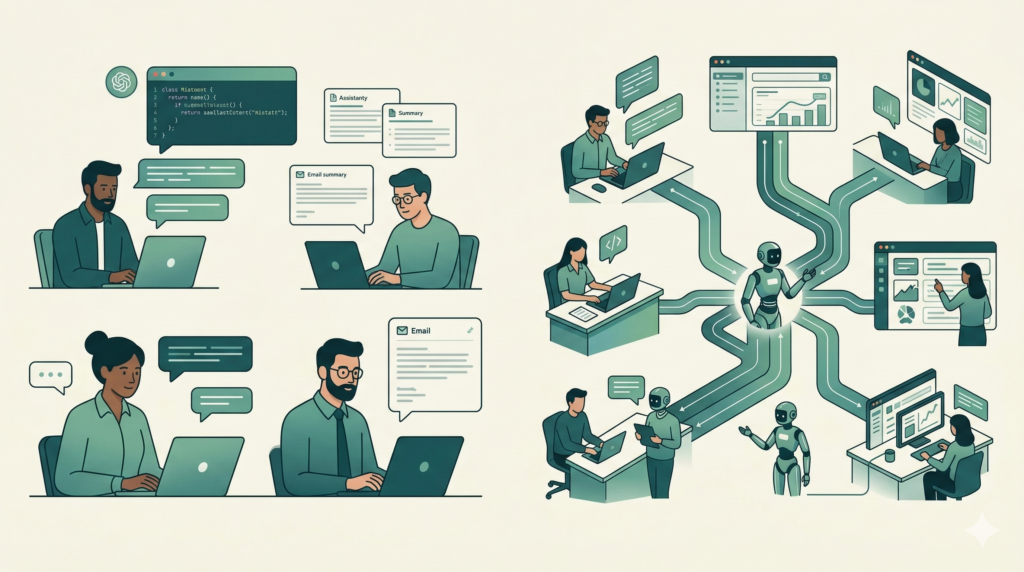
Time to put Agents back in the spotlight
Remember when AI agents were the next big thing? For a few months last year, every conference keynote and thought piece was about autonomous agents that could reason, plan, and take action. Then the hype quieted down. The conversation shifted back to chatbots, copilots, and prompt engineering tips.
Plenty of software vendors have embedded intelligent agents into their platforms; customer support tools that handle tier-1 tickets autonomously, sales platforms that qualify and route leads without human intervention, DevOps systems that detect incidents and trigger remediation workflows. These aren’t experimental anymore. They’re all working examples of how to scale productivity with Agents.
What hasn’t happened yet is broader organizational adoption. Many companies watched the agent hype from the sidelines, waiting for the dust to settle. Others experimented with a proof of concept that never made it to production. The result is a significant gap: the technology is proven, the patterns are established, but a huge number of organizations haven’t built a single agent that operates within their own workflows.
After months of pioneering by early adopters, the playbook is becoming clear. We know what works: agents scoped to a specific domain, connected to relevant knowledge and tools, with feedback loops that drive continuous improvement. We know what doesn’t: overly ambitious “do everything” agents with no clear boundaries or data strategy.
Some examples of agents that are already delivering measurable value for organizations:
- Decision support agents that help sales, procurement, and operations teams make better decisions by combining real-time context with machine learning models trained on the organization’s own data. Think demand forecasting, pricing optimization, or supplier risk scoring, surfaced at the moment a decision needs to be made
- Data agents that connect directly to your organizational data, use a semantic model to understand its structure and meaning, and let anyone across the business pull fast insights without writing a query or waiting on an analyst
- IT service desk agents that answer employee questions, troubleshoot issues, and create tickets, learning from every resolved case
- Recruitment screening agents that parse applications, match candidates to role requirements, and schedule interviews
- Compliance monitoring agents that continuously scan transactions or communications for policy violations and flag anomalies
- Internal knowledge agents that surface the right document, policy, or procedure when employees need it without anyone maintaining a wiki
These agents don’t replace people. They handle the high-volume, repeatable, knowledge-intensive work that buries departments, freeing up human experts for the judgment calls that actually require them.
One pattern we’ve seen work particularly well is what we call the Company Assistant Framework.
Introducing the Company Assistant Framework
At Maiju, we’ve developed a repeatable pattern for deploying AI agents at the departmental level. We call it the Company Assistant Framework.
The idea is straightforward: instead of giving every employee a general-purpose copilot and hoping they figure out how to use it, you build purpose-specific agents that are deeply connected to each department’s knowledge base, tools, and workflows.
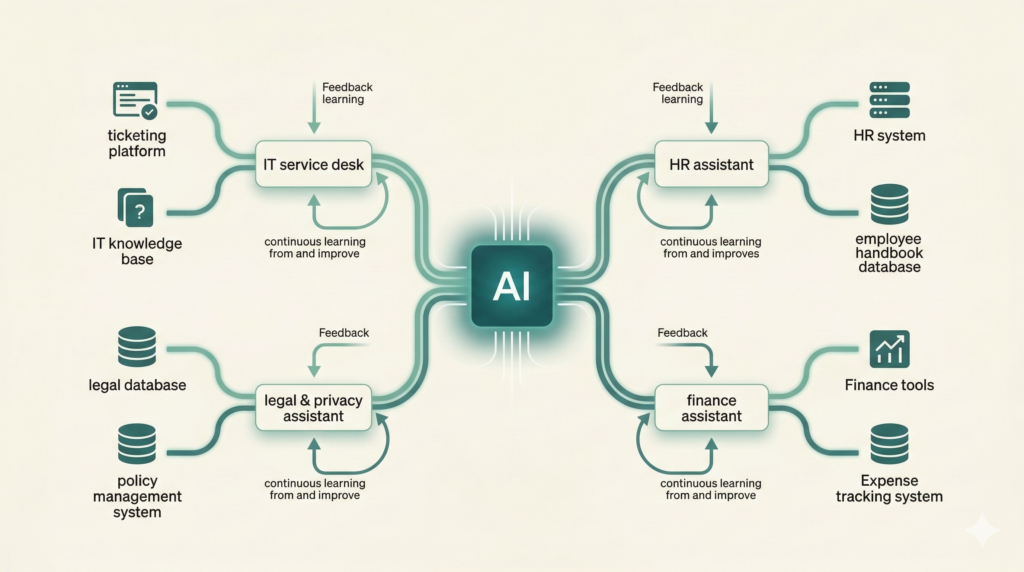
Each departmental agent shares the same architectural DNA:
- A curated knowledge base: connected to the department’s guides, documentation, policies, and historical data
- Tool integrations: plugged into the systems employees actually use (ticketing, HRIS, legal databases, finance tools)
- A feedback loop: so the agent learns and improves from every interaction, without manual curation
Here’s what this looks like in practice across departments:
- IT Service Desk Agent: Resolves employee questions using internal guides, past ticket solutions, and live system logs. Creates tickets in the ticketing system when issues can’t be self-served.
- HR Assistant: Answers policy questions (leave, benefits, expenses), guides new hires through onboarding steps, and routes complex cases to the right HR specialist.
- Legal & Privacy Assistant: Helps employees navigate compliance requirements, surfaces relevant contract clauses, and flags potential privacy risks before they escalate.
- Finance Assistant: Handles expense policy queries, surfaces reporting data, and walks employees through procurement workflows.
The pattern is the same every time. What changes is the knowledge base and the toolset.
The Self-Learning IT Service Desk
The IT service desk is where we consistently see the fastest return on investment. Why? Because IT departments sit on a goldmine of structured, high-quality training data — and most of them don’t realize it.
Every resolved ticket contains a problem description, a resolution path, and an outcome. That’s exactly the data an agent needs to learn how to handle similar issues in the future.
The result is an IT assistant that gets better every single week, without anyone manually curating a knowledge base, updating a wiki, or maintaining an FAQ.
Why this beats a chatbot
Traditional IT chatbots are static. Someone has to write the responses, maintain the decision trees, and update the knowledge when things change. In practice, this means the chatbot degrades over time. Three months after launch, half the answers are outdated.
A personal copilot, meanwhile, has no institutional context. It can help an individual IT technician draft a response faster, but it doesn’t capture and distribute that knowledge to the rest of the organization.
The Company Assistant Framework solves both problems. It’s dynamic (self-learning from real resolutions), contextual (connected to your actual systems and data), and organizational (the knowledge compounds across the entire department, not just one person’s workflow).
Getting started
If you’re considering deploying departmental agents in your organization, here are the key decisions to make early:
Pick the right department first. Start where you have the highest volume of repeatable questions, the most structured historical data, and a clear feedback mechanism. IT service desks and HR are usually the best starting points.
Invest in the knowledge pipeline, not the chatbot UI. The agent’s value comes from the quality of its knowledge base and retrieval system, not from how the chat window looks. Spend 80% of your effort on ingestion, sanitization, and indexing.
Design the feedback loop from day one. Without quality signals flowing back into the system, you’re building a static chatbot with extra steps. Thumbs up/down, deflection rates, and reopen rates are your minimum viable feedback.
Plan for knowledge lifecycle management. Knowledge decays. Policies change. Systems get updated. Build deprecation and expiration into your architecture from the start, or you’ll end up with the same knowledge rot problem that killed your wiki.
Need some help to scale productivity with agents? We can help you get started. From implementing best practice agents to exploring new ideas, we’ve got you covered.