
Modern teams already write, analyze, and present all day. The difference now is speed—and that speed comes from skill, not mere access to tools. When your people learn to prompt well, use Microsoft 365 Copilot or ChatGPT smartly, and (where it makes sense) layer in simple automations, those gains manifest in real, measurable work.
Why AI training still matters
Some people think that AI has been around long enough to skip on employee training. Everyone is using AI right?
Why should you need a training for that?
In one large-scale study of customer‑support agents, adding a generative‑AI assistant boosted issues resolved per hour by ~15 %. In controlled writing tests, people using ChatGPT cut time by ~37 % while raising output quality. In developer environments, GitHub Copilot use has yielded 5–6.5 % productivity lifts in real projects. Across these and other evaluations, tangible improvements show up, especially when you invest in how people use AI, not just providing tools.
McKinsey’s 2025 report emphasizes it: most companies invest in AI, but leadership and adoption lag behind. And PwC highlights that deploying AI is as much about people and culture as technology.
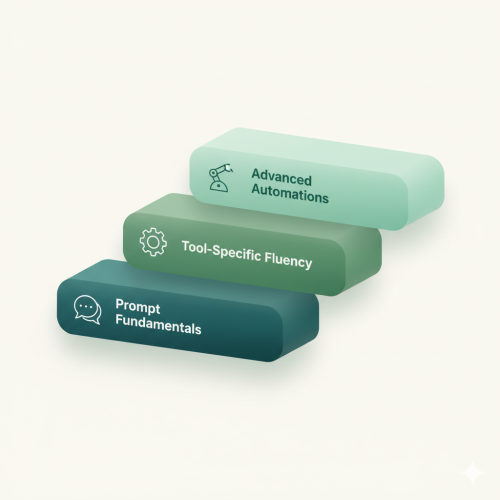
The Maiju Three‑Level Training Framework
Not everyone needs the same depth. Start foundational, build tool fluency next, and only add automations when they deliver clear ROI.
Level 1 – Prompt Fundamentals (everyone)
Goal: Teach smart prompting so outputs are usable from day one.
What participants practice:
- Prompt templates that work in Copilot, ChatGPT, Claude & Gemini
- Bundling role + task + context + format + guardrails
- Techniques like “ask two clarifying questions first”
- Quick sanity checks on accuracy, tone, and completeness
Impact:
Much of the productivity uplift comes from applying AI to day-to-day writing, summarizing, editing, and formatting. The biggest benefits often accrue to less experienced staff.
Ideal early use cases:
- Email triage & replies
- Meeting notes & action items
- Drafts of internal policies, FAQs
- Quick data cleanups & tables in Excel
- Presentation preparation
Level 2 – Tool‑Specific Fluency (ChatGPT + Microsoft 365 Copilot)
Once the prompting foundation is solid, train people on the tools they already use.
Focus domains:
- Outlook & Teams: reply drafting, tone modulation, meeting recaps → tasks
- Word & PowerPoint: first drafts, outlines, citations, slide blueprints
- Tools: give AI tools to make it smarter
- ChatGPT: working with projects and custom GPT’s
How sessions run (hands‑on):
- Choose 5–10 core tasks per function (Sales, HR, Ops, Finance, Marketing)
- Participants work on their own files
- Capture and save winning prompts in a shared library
Why this stage matters:
Generic demos fall flat. But when people see AI help with their actual work, adoption sticks, and gains multiply. BCG saw >25 % speed and >40 % quality lifts when tasks aligned with AI strengths (but warned of performance drops outside that range). Training keeps teams “inside the AI frontier.”
Level 3 – Selected Agents & Automations
Reserved for roles where automation can scale impact.
What we build:
- Copilot Studio mini‑agents (policy Q&A, intake forms, FAQ bots)
- n8n workflows (file routing, CRM updates, invoice triage)
- Guardrails: restricted data sources, logs, validation steps
When to use it:
- Task is high volume and rule‑based
- Human reviews exceptions
- There’s a clear owner for upkeep
Why it pays:
Well-governed automations reduce manual grunt work and allow human oversight. Paired with training, they let teams avoid “random acts of automation.”
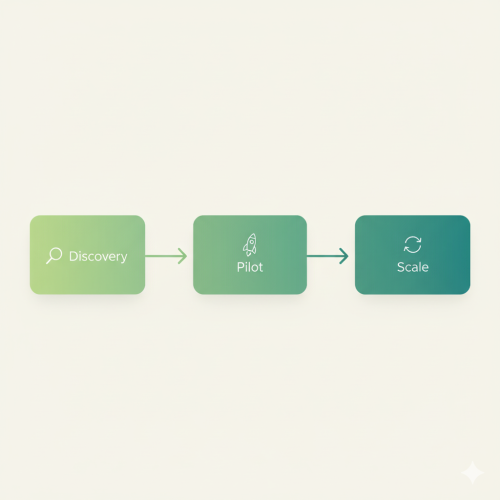
Program Design That Actually Lasts
Phase 0 – Discovery (1–2 weeks)
- Stakeholder interviews
- Map everyday tasks per team
- Set “no-go” rules for sensitive data
Phase 1 – Pilot (4–6 weeks)
- Company-wide Level 1 prompting cohort
- Function-specific Level 2 tool workshops
- Collect winning prompts into a shared library
- Optional Level 3 mini pilot where clear ROI exists
Phase 2 – Scale & Sustained adoption
- Monthly “show & tell” of top prompts and hacks
- Designate prompt‑library owner per team
- Micro‑refreshers whenever Copilot or ChatGPT updates
If you think that introducing AI tools is just a fire and forget, you are setting up for failure. The first stap should always be training, but it should never end there.
The initial training will ensure that your users will get more out of the AI tools of today. While this is great, AI is a rapidly evolving field. At the time of writing, it is safe to say that the game resets every 6-8 months. Working on sustained adoption will keep your employees up to date so they can thrive in the age of AI.

Measuring ROI
We believe that AI training should prove its value in the real world, not just in theory. That’s why our ROI measurement framework focuses on clear, observable results within weeks, not months.
We start by tracking a handful of everyday tasks before and after training to measure time saved, quality of output, and adoption rates. Managers provide quick quality scores on a simple 1–5 scale, and we compare how often teams actually use their new prompt library or Copilot features week by week.
For teams that work with Microsoft 365 Copilot, we even introduced our Microsoft Copilot ROI calculator — a simple but effective model that converts time savings into real financial value. By entering average hourly cost and estimated time saved per employee, teams can instantly see the potential return on investment from their AI adoption program.
Even modest improvements make a big difference. A 5–10% gain in productivity across knowledge workers typically covers the cost of training many times over.
Role‑Specific Use Cases
| Role | Typical Use Cases | Possible Agent / Automation |
|---|---|---|
| Sales & CS | Proposal drafts, CRM cleanup, call summaries | Lead qualification helper, rules-based follow-up bot |
| HR | Candidate summaries, policy drafts, internal comms | Policy bot (answers where docs live) |
| Finance & Ops | Routine reports, Excel cleaning, supplier mails | Invoice routing, folder naming, status updates |
| Marketing & Comms | Drafts, tone polishing, content reuse, social calendars | Brand-voice checker |
Will AI replace people?
How technical is this training?
How can I drive continuous adoption?
Get Started!
If you want AI training your team can start using today, let’s begin with a short discovery and pilot plan. Our approach focuses on real tasks, simple rules, and measurable results, exactly what makes AI education stick.