
The latest update from OpenAI adds something that’s been missing since ChatGPT’s launch: initiative.
Yes, there was a lot of hype before the launch of GPT 5. The launch itself left people wondering if OpenAI had lost it edge.
With the new ChatGPT Agent Kit, OpenAI is silently knocking at the door of popular tools like Copilot Studio or n8n. And OpenAI is not the only one. Google’s Gemini is also launching a platform to build Gemini Agents.
It breaks open the game for SMB’s that are wondering what their AI toolkit should be. Previously, Microsoft Copilot paired with Copilot Studio and ChatGPT paired with n8n were the most common choices. Is the launch of ChatGPT Agent Kit changing the game?
What the ChatGPT Agent Kit Actually Does
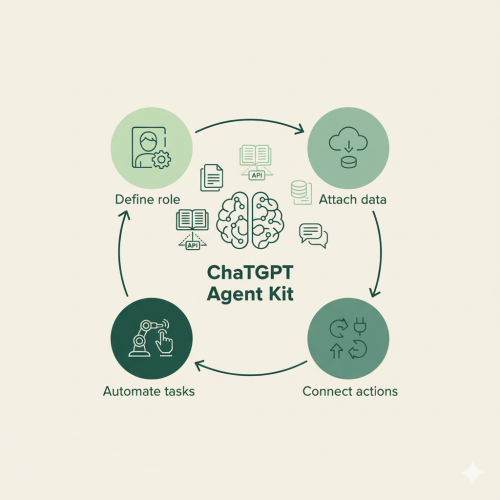
The ChatGPT Agent Kit is essentially a builder for creating tailored versions of ChatGPT.
You can give your assistant a defined role, a memory of your data, and access to external tools through actions and APIs.
Instead of starting every chat from scratch, your agent can “remember” its purpose and interact with the systems you already use.
Think of it as ChatGPT with a job description.
Here’s what that looks like in practice:
- You define a clear role (“You’re an HR assistant who helps with policy questions.”)
- You attach relevant documents or data (“Here’s our employee handbook.”)
- You connect it to actions or tools (“Update records in Notion,” “Fetch data from our CRM,” etc.)
From then on, that agent operates with its own personality, access, and task list.
It’s the difference between asking for a to-do list and having someone quietly get the to-do list done.
How It’s Being Used
Early users (like the Maiju Team) have started building agents to test the limits of ChatGPT Agent Kit. A few examples:
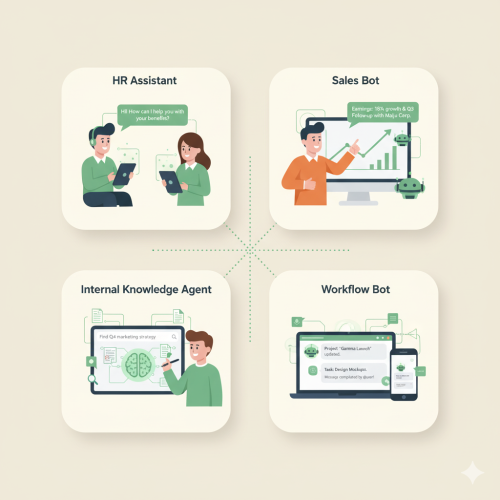
- HR support bots answering internal questions and drafting policy summaries
- Marketing assistant connected to SEO tools and web analytics to optimize webcontent
- Sales assistants that research leads, summarize discovery calls, and update CRM notes
- Internal knowledge agents that find information buried in shared drives or manuals
- Simple workflow triggers that push updates to Slack or log recurring reports
In most of these cases, the agent isn’t replacing a person. It’s handling the tasks no one enjoys doing.
Having said that, it is not yet close to Microsoft Copilot or n8n. It misses the depth of operators and the vast amount of out-of-the-box integrations that n8n supports. The deep integration with M365 that Copilot Studio offers, is far superior to the options the Agent Kit offers.
But does it matter?
A small business might not need all the complexity that the competition has to offer. On the other hand, tech savvy companies might feel just fine with creating custom integrations to extend the ChatGPT Agent Kit.
The Experience of Building an Agent
The creation process is refreshingly straightforward. It’s a guided setup inside ChatGPT: you describe your agent, upload documents, and (if you want) add integrations. No coding required. That simplicity is both its biggest strength and limitation. It’s accessible enough for non-technical users to get something working within an hour, but power users will still hit walls when it comes to complex logic or authentication. For most small businesses, that trade-off is fine. The goal isn’t sophistication, it’s usefulness. Once built, you can test the agent right inside the Agent Kit, share it with colleagues, or deploy it as a web widget. The learning curve is surprisingly gentle, especially compared to older chatbot frameworks.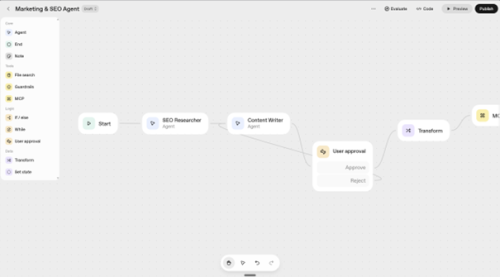
How It Compares to Microsoft Copilot Studio
This is the question many SMBs ask first. Both OpenAI and Microsoft now let you build AI assistants, but they serve slightly different audiences.| Feature | ChatGPT Agent Kit | Microsoft Copilot Studio |
| Purpose | Flexible, creative agent building | Secure, internal automation |
| Data access | Uploaded files or APIs | Microsoft 365 data via Graph |
| Governance | Workspace-level controls | Tenant-level with DLP, ALM & audit |
| Distribution | Widgets, custom code and ChatGPT workspace | M365 apps and custom integrations |
| Best for | Prototyping, experimentation, customer bots | Enterprise workflows, compliance-sensitive teams |
Strengths & Limitations
The Agent Kit works because it’s practical. It doesn’t try to reinvent AI; it packages what people were already doing (long prompts, custom instructions, and manual integrations) into a cleaner format.-
- It’s fast to get something working.
- It’s visual and doesn’t require technical setup.
- Agents can share knowledge and tone across teams.
- It fits naturally into daily work, right inside ChatGPT.
-
- There’s limited visibility into what the agent is doing behind the scenes.
- You can’t yet manage access or version control as easily as in enterprise tools.
- Some integrations are fragile or limited to basic API endpoints.
- Governance remains a DIY effort, important if your business handles sensitive data.
The Broader Impact
The release of the Agent Kit signals a shift in how AI fits into business workflows. Instead of focusing on one universal assistant, OpenAI is giving people the ability to make many small, specialized assistants, each solving one problem really well. It’s a quieter kind of progress. No flashy demos or viral prompts, just a growing number of useful tools doing small jobs, reliably. That approach makes sense for SMBs, who don’t have time or budgets for enterprise-scale AI projects. You can start small, prove value, and grow from there.Getting Started
If you’re considering experimenting with the ChatGPT Agent Kit:-
- Start with one narrow use case. Something repetitive, low-risk, and easy to measure.
- Keep the agent’s role focused — one job, not five.
- Document what it’s allowed to access and how.
- Treat the first version as a prototype.
- Measure outcomes before scaling.
Final Thoughts
The ChatGPT Agent Kit doesn’t revolutionize AI overnight but it does make it more usable.
For the first time, small teams can create tailored assistants that actually do work, without needing developers or complex setup.
It’s part of a bigger trend: moving from prompting AI to deploying AI.
And that shift, while subtle, is one of the most meaningful we’ve seen so far.
Whether you’re in HR, sales, or operations, the takeaway is simple:
You can now build your own assistant. It won’t replace your team, it’ll make them faster.
And that’s worth exploring. To answer our question: Is it worth the hype?
Our verdict: it depends on what you need. It is far from being a real n8n alternative. But it’s a good first step.
Want to explore ChatGPT Agent Kit in more detail? We got you covered.