
Microsoft Copilot Agents – More Than just an Assistant
Imagine having a coworker who never gets tired, never misses a follow-up, and doesn’t need coffee breaks. That’s what Microsoft Copilot Agents are aiming to be: the kind of teammate who quietly handles repetitive stuff so your real team can focus on work that actually matters.
You’ve probably heard about Microsoft Copilot by now, the AI assistant built right into your everyday Microsoft 365 apps. It writes emails, summarizes meetings, drafts reports, and generally makes you feel like you’re living in the future. But Copilot Agents take things a step further. Instead of waiting for you to give commands, they can actually run processes on their own. Think of the difference between a helpful assistant and a proactive team member who just gets things done before you even ask.

So, What Exactly Are Copilot Agents?
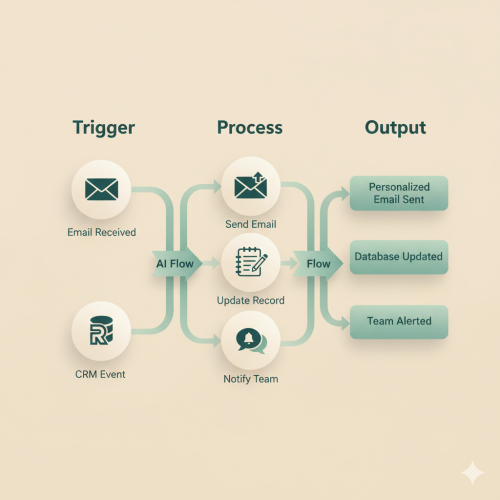
Copilot Agents are customized, purpose-built versions of Microsoft Copilot that act like specialized mini-employees. Rather than living passively in your Word or Teams interface, they can monitor specific events (say, a new lead being added to your CRM or an expense report getting submitted ) and then take a series of actions automatically.
In other words, regular Copilot helps you do tasks; Copilot Agents help you stop doing them altogether. They’re powered by the same AI backbone as Copilot, but with added automation and triggers that let them operate semi-autonomously across your Microsoft 365 environment, from Outlook and Teams to SharePoint, Dynamics, and beyond.
Copilot vs. Copilot Agents: The “Assistant vs. Teammate” Analogy
Think of Copilot as your bright intern, someone who needs instructions: “Summarize this meeting,” “Draft an email,” “Build me a table.” They’re helpful, quick, and surprisingly capable but still waiting for direction.
Copilot Agents, on the other hand, are more like your operations manager. They know the playbook, understand the triggers, and can run with the ball without you watching over their shoulder. They don’t need a prompt to act, they recognize a pattern or event, follow pre-set rules, and deliver the result. You set the boundaries, and they take care of business.
That’s why many SMBs are starting to treat Agents not just as tools, but as digital teammates woven into daily operations.
How Small Businesses Are Already Putting Them to Work
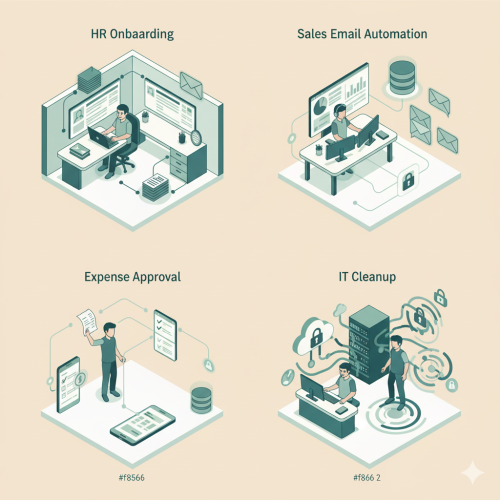
Let’s bring this down to earth. Imagine you run a growing business juggling HR tasks, customer support, and sales follow-ups. Here’s what Copilot Agents could quietly take off your plate:
- HR: Every time you add a new hire in your HR system, an Agent can automatically create their Microsoft 365 account, send the welcome email, and even book the orientation meeting. No more “Did someone send the new hire form?” confusion.
- Sales: When a lead warms up in your CRM, an Agent can send a follow-up email, schedule a Teams demo, and nudge the sales rep if no response comes in a few days. It’s like having a sales coordinator who never sleeps.
- Accounting: Expenses piling up? An Agent can scan submissions, flag non-compliant receipts, and send them to the right manager for approval, long before month-end chaos hits.
- Customer Service: If a support ticket lingers too long, an Agent can escalate it, ping the manager in Teams, and summarize the conversation thread. It’s the watchdog you wish you’d had six months ago.
- IT: Agents can even help keep your tech tidy, scanning for unused licenses, revoking old access, and generating compliance reports before your next audit.
Every one of these examples frees your human staff from repetitive, rule-based work, and unlike humans, Agents don’t take holidays or misplace sticky notes.
Building a Copilot Agent: Easier Than You Think
You don’t need a computer science degree to set one up. Building a Copilot Agent starts with mapping out what you want it to do — the “when X happens, do Y” kind of thinking. Then you define triggers (the events that start the process), connect your data sources (like Outlook, SharePoint, or Dynamics), and lay out the steps. You can even go beyond the basics and give your agent tools or connect them to other agents to create more complex capabilities.
With Copilot Studio, Microsoft provides a visual editor that feels more like connecting puzzle pieces than writing code. Once your workflow is set, you decide what permissions it needs, add any approval steps, and test it in a sandbox environment. After that, it’s ready to roll, quietly running in the background, logging everything it does so you can monitor performance and tweak things as you go. It’s automation with training wheels, powerful enough to save hours every week, but designed so you stay in control.